
We (ActiveState) released Komodo 6.0 RC 1 today and we want your feedback. If you are using beta 3 from about a month ago you can update via Komodo's Help > Check for Updates... menu entry. If you are a current Komodo IDE 5 or Komodo Edit 5 user; in the market for a new Python, Perl, PHP, Ruby, JavaScript, Tcl, XML, HTML, CSS IDE or editor; interested in hacking on an open source editor; or just curious please download the release candidate:
Read some of the details below and tell us how you really feel:
What's New in RC 1?
- Project changes
- projects are now accessible through the places panel
- project tools are now merged into the main toolbox
- codeintel and fast open utilize the open project
- Menu changes
- the Komodo menus have been tweaked
- provides better functionality grouping and consistency
- Side panes
- left pane now uses a vertical tab layout
- customize the layout through the Appearance prefs
- Places
- fixed a number of CPU performance issues
- International keyboard and IME improvements
- Stability improvements on all platforms
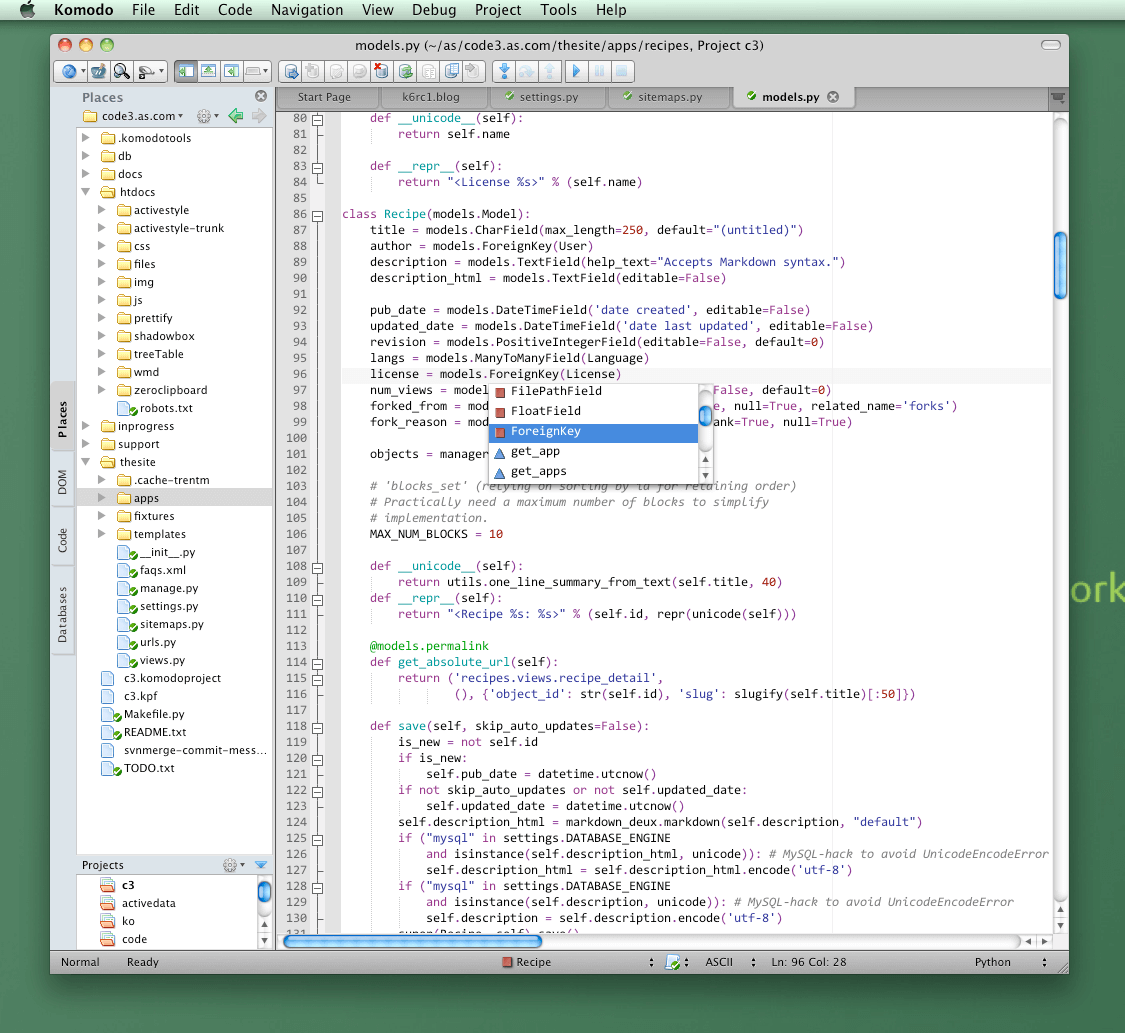
What's New in Komodo 6?
A lot. HTML 5 autocomplete. CSS 3 autocomplete. Full Python 3 support (debugging, syntax checking, autocomplete, code browsing). A new Database Explorer tool for quickly exploring SQL databases (SQLite out of the box and extensions for MySQL and Oracle, with plans for Postgres). A new project system called "Places" that adds a file system browser (local and remote). New publishing support for syncing a directory with a remote machine. Additions to Komodo's Hyperlinks for quickly navigating to file references. Added support for PHP, Perl, Ruby and JavaScript regular expression debugging with Komodo's excellent Rx tool. See the Komodo 6.0 Features post for a full outline.
Your feedback please
We're hoping that a Komodo 6 final release is not too far away now. We'd love to have your input on how we can polish and improve on the above work and how we can make Komodo IDE and Komodo Edit tools that help you get your coding work done faster. Please subscribe to this blog or follow @activestate on twitter for coming posts that go into detail on what's coming and new in Komodo 6. And please give us your feedback. Enjoy.

Trackback URL for this post:
Comments
The final release will be out very very soon.
You should be able to right click on a project and select "Remove from Recent Projects" in the "Projects" subpanel of the Places sidebar. If not, then that change was after the RC1 build. Check out a nightly here: http://downloads.activestate.com/Komodo/nightly/
Hi,
I am using Komodo Edit, because IDE cannot show multiple projects open at sidebar tree.
Can 6.0 show multiple open projects and their files in Places, or it is still monoteistic in it's IDE incarnation? I do not want to close currently open project & its files, like IDE 5.x does, just to apply a quick fix to other project's file and commit it.
E.g. wanted to see all available files from multiple projects (like in Edit), but with full project-support (VCS, debugging), like in IDE. Is it possible in this version?
@evan: Thanks! That resize slowness is only seen on Linux. Here is the bug for it: http://bugs.activestate.com/show_bug.cgi?id=88049
I just wrote a follow-up article after a few more days experience with RC1.
"A few more days with Komodo IDE 6.0.0 RC1"
http://bit.ly/dqrLmU
I'll throw some bugs into the database as you mentioned earlier, Trent.
Hi, thanks for your work.
I was wondering: is the OSX theme in this RC definitive (barring fixing bugs/obvious glitches), or are there plans to improve it?
This may be harsh, but in my opinion the current look and feel on OSX lacks refinement and only gets the native look halfway done. (I do understand UI nitpicking may not be a priority for both Komodo developers and users.)
I may switch to OSX full-time in the next few months, so I'm looking at other editors, since the cross-platform advantage of Komodo won't be a factor then (I currently use Komodo Edit 5 on both Ubuntu and OSX). And unless I fall in love with the competition, I'd love to look at theme building and try to achieve a great native look. (I think somebody did this for Win7.)
So: is the current OSX theme final? Should I wait for improvements before digging in?
I missed beta3, it seems, but I put up a review of Komodo IDE 6.0.0 RC1: http://www.danhulton.com/blog/2010/09/14/komodo-ide-6-0-0-rc1-review/
No explicit Jython support currently, unfortunately. However, Komodo does have a mechanism where by autocomplete for 'java' imports in Jython would be possible. Komodo's Code Intelligence system has allows one to add "API Catalogs". These are XML files that define an API and are used to provide autocomplete and calltips. For example Komodo ships with a pywin32.cix (CIX == Code Intelligence Xml) that defines the Python PyWin32 API -- i.e. it tells Komodo what to do for autocomplete when it sees "import win32api" et al.
Someone could write a jython.cix that was a Python API catalog for the "java" namespace. Presumably this would be generated by a script. I'm not a Jython developer so I don't know how difficult that would be, but I presume that it would be fairly straightforward using Jython introspection. A good start (if you or any reader is interested) is to look at pywin32.cix in a Komodo install and at the RelaxNG schema (with comments) for the CIX format (http://svn.openkomodo.com/openkomodo/view/openkomodo/trunk/src/codeintel...) and to ask questions on the Komodo forums (http://community.activestate.com/).
The limitation here is that an API catalog is static: i.e. this would only cover java APIs that are known ahead of time and not java imports that are, say, only on the end user machine. If the generator script were open source, then users could run that over their Java libs to generate API catalogs for those.
The full solution would be an extension to Komodo's codeintel system's scanning to support scanning Java class libraries in the fly. That would require a motivated hacker to dig into the codeintel system in openkomodo (http://svn.openkomodo.com/openkomodo/browse/openkomodo/trunk/src/codeintel).
However, getting a good jython.cix I think would be a great 80% solution.
There is "Edit > Find in Current Project..." in the main menu (where it was before, I believe). As well, the Ctrl+Shift+F (Cmd+Shift+F on the Mac) keybinding for "Find in Files..." will remember its search scope: i.e. will remember to find "in current project" if you set the scope to that. You can also use "right-click > Find..." on the any of the directory nodes in places (including the root node). I suppose a "Find in Project..." entry in the "Projects" subpanel cog menu might be justified.
Thanks for the reply Trent.
I believe Search field I have been speaking about has kinda different functionality. To see what i mean:
http://dl.dropbox.com/u/25643/search.png
It was pretty useful and to be honest i really miss this feature...
Ah, the Places filter box. Unfortunately, no, we won't have this for 6.0 final release. Perhaps we can revisit for a 6.1 release. The problem was with potential large perf problems if the tree was large. Think about running a filter to find all files match "foo" when the Places root dir is '/'.
One thought we had was to use the fastopen dialog (File | Open | Fast Open...), put into a mode to search recursively only under the current Places root dir. That would help with the use case of trying to find files matching a certain filter string. The fastopen dialog as is wouldn't visually show a *hierarchy* though.
It would be helpful to know people's particular use cases for this (and any) feature to help us impl features.