How to Audit Your Minimus Container Image Inventory Before the Registry Shutdown
Jonny Rivera
September 9, 2026
Share post:
Your team has roughly 8 weeks to figure out what'srunning in production before the Minimus registry goes dark on 22 October. Most teams don't have that list today. They have a rough sense of it, a few Slack threads, and a Dockerfile someone wrote 2 years ago that may or may not still be accurate.
Before you evaluate a single replacement, you need the real list. Here's how to build one.
Key Takeaways
Inventory the images before you inventory vendors. Every decision downstream, timeline, budget, replacement choice, depends on this list being accurate.
A complete inventory has three parts: the image, its source registry, and what your team layered on top of it.
kubectl and docker surface your running image list in minutes. Mapping what's layered on top takes an extra step most teams skip.
Custom Enterprise builds are a harder replacement problem than public Community Edition pulls, and they need to be flagged separately from day one.
A finished inventory turns a vendor conversation from live discovery into a scoped, specific ask, which is the only version of that conversation that produces a real answer.
Most teams can't answer this question today
Ask your team right now which images in production came from Minimus. If the answer takes more than a few minutes, or requires pinging three different people, that's the actual starting point for this migration. Not the vendor evaluation. Not the timeline. The inventory.
An inventory here means three things for every image, not just its name:
The image and its source registry. Which images are running, and where did each one come from? For this migration specifically, that means separating anything pulled from reg.mini.dev from images sourced elsewhere.
What's layered on top. A base image is rarely what ships to production untouched. Your team adds language runtimes, application dependencies, internal libraries. That upper layer is where a large share of container risk lives, and it was never the base image vendor's job to cover it in the first place.
Community Edition versus custom Enterprise build. A publicly pulled image and a custom image built under an enterprise agreement are not the same replacement problem. The custom ones took longer to get right the first time. They'll take longer to replace. Flag them now, not 3 weeks into a migration timeline you already committed to.
Finding every image currently running
Start with what's deployed, not what's sitting in a registry gathering dust. A registry accumulates images nobody has run in months. Production truth lives in your cluster.
If you run Kubernetes, list every image currently in use across every namespace:
That returns a deduplicated list of every image string currently running. Filter it down to Minimus pulls specifically:
Init containers and sidecars get missed if you only check .spec.containers. Add .spec.initContainers[*].image to the same command, or you'll be explaining a gap in your inventory later instead of catching it now.
If you're running plain Docker or Docker Compose, the equivalent is:
for what's currently running, and
for anything pulled and sitting locally, running or not.
Don't stop at running containers. CI/CD pipelines, cron jobs, and scheduled batch workloads reference images without keeping a container running continuously. Check your pipeline configs and job manifests directly for reg.mini.dev references. The images that only spin up once a week are exactly the ones that get missed and exactly the ones that surprise you in November.
Mapping what's layered on top of each image
Knowing which images you have is step one. Knowing what's inside them is the step that determines how hard each one is to replace, and it's the step most inventories skip.
Check the layer history first:
This shows every layer and the command that created it, usually enough to see where the base image ends and your application layer begins.
Generate a software bill of materials (SBOM) for anything that doesn't already have one. If you can't produce an SBOM for an image today, you can't answer what's in that upper layer with any confidence, no matter how long you've been running it. Syft is a common option:
Run this against your highest-priority images first: production, anything touching a regulated workload, anything you flagged as a custom Enterprise build above. If the output surfaces packages you didn't expect, that's useful information independent of Minimus entirely.
No existing SBOM is itself a data point. If half your Minimus-sourced images have never had one generated, that tells you how much manual work this audit is, and it's better to know that in week one than week seven.
A five-step checklist for building the inventory
Pull the running image list. Use the kubectl or docker commands above. This is your baseline, not your final answer, since pipeline and batch jobs won't show up here.
Cross-reference CI/CD and scheduled jobs. Search pipeline configs and cron manifests for reg.mini.dev directly. Anything that runs less than daily is easy to miss in step one.
Generate SBOMs for anything without one. Prioritize production images and regulated workloads first. An image with no SBOM is a bigger unknown than one with a stale one.
Flag Community Edition versus custom Enterprise builds. Cross-reference against your Minimus contract or procurement records. Treat anything unconfirmed as custom until proven otherwise.
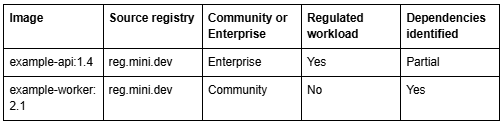
Consolidate into one table. Five columns is enough: image, source registry, build type, regulated workload (yes or no), dependencies identified (yes or no, partial). This is the version you bring to a vendor conversation.
What this list buys you
An unfinished inventory means every vendor conversation starts with discovery. You spend the first call describing what you run instead of asking whether a given approach covers it.
A finished one changes the conversation. You hand over a specific list and ask a specific question: which of these do you cover, and which do you not. That's the shorter version of this conversation, and it's the only one that gets you a real answer instead of a general pitch.
It also surfaces the harder question sitting underneath this migration, which we covered in the first post in this series: a hardened base image covers the operating system layer. The application dependencies layered on top are a separate problem, and most replacement vendors aren't covering that part either. You can't see that gap until you've mapped what's layered on your own images, which is what this audit does.
How ActiveState helps
If your inventory is built, send it to us. We'll map it against the ActiveState Curated Catalog and come back with a straight answer: which images map to a language-core base, which upper layers your team would source from the catalog instead of a public registry, and which workloads we don't cover at all. No cost, no meeting required to start.
If the inventory itself is where you're stuck, talk to a Container Security Engineer who can walk the commands above against your actual environment, or help scope which images to prioritize first.
About the Author:Jonny Rivera is ActiveState's Senior Director of Product Management, working closely with the ActiveState engineering team on open source software security. ActiveState provides a curated, provenance-backed library of built-from-source open source components and contractual remediation SLAs, so teams can build secure, reproducible software environments without trading away developer velocity. Learn more atActiveState.com.
Frequently Asked Questions
What command finds every image pulled from a specific registry across a cluster?
kubectl get pods --all-namespaces -o jsonpath="{range .items[*]}{.spec.containers[*].image}{'\n'}{end}" returns every running image, which you can filter with grep for a specific registry hostname. Check .spec.initContainers[*].image too. Init containers and sidecars are easy to miss with a containers-only query.
How do I tell which layers came from the base image versus my own build?
docker history --no-trunc <image-name> shows every layer and the command that created it, usually enough to see where a base image ends and your application layer begins. For a complete picture of what's in that upper layer, generate an SBOM with a tool like Syft.
Do I need an SBOM for images that don't already have one?
Yes, if you want a confident answer about what your application layer contains. Without one, you're relying on institutional memory about what got added to an image over time, and that's rarely complete and rarely current.
How do I identify custom or Enterprise-built images versus Community Edition pulls?
This usually isn't visible from image metadata alone. Cross-reference your image list against procurement or contract records for any enterprise agreement, and treat anything unconfirmed as custom until proven otherwise. Custom builds are the harder replacement problem and the ones most worth flagging early.
Can this audit be automated for a recurring check?
Yes, and it's worth doing regardless of the Minimus timeline. Wrap the commands above into a scheduled job that re-runs the inventory and diffs it against the previous run. Registries and dependency trees change continuously, and a one-time audit goes stale the moment your next deployment ships.
What's the difference between an image that's running and one that's just sitting in a registry?
A registry accumulates images that were pulled at some point and may never run again. kubectl get pods or docker ps show what's deployed right now, which is where your migration priority belongs. Images sitting unused in a registry are a cleanup task, not a migration blocker, though it's worth confirming that before you deprioritize them.
What do I do if an image has no clear source registry recorded?
Check your CI/CD pipeline definitions and deployment manifests directly. The image reference used at deploy time usually includes the full registry path even when the running container's metadata doesn't make it obvious. If neither source resolves it, flag the image as unidentified and prioritize it for manual review instead of guessing.
.png)