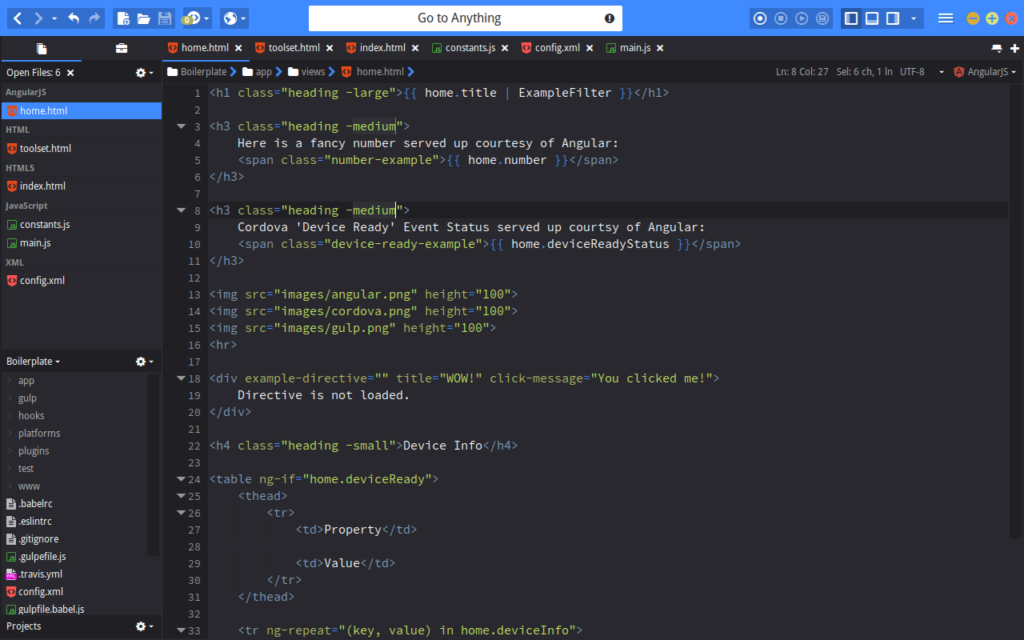
Komodo Edit is a free, open source editor from dynamic language experts.
Whatever Your Language
Komodo Edit supports PHP, Python, Ruby, Perl and Tcl, plus JavaScript, CSS, HTML and template languages like
RHTML, Template-Toolkit, HTML-Smarty and Django.
Whatever Your Platform
Windows? Mac? Linux? Yes, yes and yes!
Award-winning Tools
Everything you'd expect from an editor based on the award-winning Komodo IDE, like autocomplete and calltips, multi-language file support, syntax coloring and syntax checking, Vi emulation, Emacs key bindings, and more.
Firefox-style Extensibility
Go ahead, hack away! Or download some of the cool extensions from members of the Komodo community.
It's absolutely fantastic to work with. It does everything a good editor should do, but it also adds a bunch of other little awesome things."
— Dan Hulton, www.danhulton.com
I just want to say how fabulous this product is--every time I think of something I need it has it... Good stuff!
— Lee Cave-Berry
Features and Specifications
-
-
Compare with Komodo IDE
Komodo Edit is a free, open source multi-language editor with code intelligence. Komodo IDE builds on Komodo Edit's comprehensive editing features, adding intelligent tools for debugging, regular expressions, team development and customization.
Check out the feature comparison table.
-
System Requirements
-
-
Windows
- Windows XP, 2000, 2003 or Vista
- x86 or x86_64 processor, 500 MHz (or faster) with 512 MB RAM (1 GB+ recommended)
- 200 MB hard disk space
-
Mac
- Mac OS X 10.4 or greater
- PowerPC G4+ or Intel processor
- 512 MB RAM (1 GB+ recommended)
- 200 MB hard disk space
-
Linux
- Red Hat Enterprise Linux 5 or later
- CentOS 5.0 or later
- Fedora Core 8 or later
- OpenSUSE 10.2 or later
- Ubuntu 7.04 or later
- x86 or x86_64 architecture
- 500 MHz or faster processor
- 512 MB RAM (1 GB+ recommended)
- 200 MB hard disk space
-
Developer Resources
-
Getting Started
Komodo Edit is built on the Komodo IDE code base, so all the resources
available to Komodo IDE users can help with learning Komodo Edit.
Getting Started Screencast
The Introduction to Komodo IDE
screencast will take you on a tour of Komodo IDE's key features,
including code intelligence (autocomplete and calltips) in
multi-language files, customizable key bindings and Vi emulation,
configurable toolbars, and project templates.
Features Showcase
Get to the next level by checking out any of the 18 quick tours in Feature Showcase:
take a look at some advanced search functions, explore your code using
the code analysis tools, and create custom workspace components for
code reuse and project management.
Sample Project
Take a run through Komodo IDE's sample project to familiarize yourself with Komodo's functionality.
Tutorials
Get hands-on learning about Komodo IDE's Perl, PHP, Python, Ruby, Ruby
on Rails, or Run Commands capabilities with our quick tutorials.
-
Getting Support
If at any time you need assistance, you can find the help you need.
-
Getting Involved
Komodo Community
Be a part of the Komodo
Community! Try a user-built extension or learn to create your own, ask
or answer questions, check out the latest screencasts, join Komodo
mailing lists, or just get the latest news from the Komodo Community site.