ActiveBlog

Node.js support in Komodo 7 Alpha 3
by Troy Topnik

Troy Topnik, June 23, 2011
Node support in Komodo

After months of hearing the question "When are you adding Node.js support to Komodo?" I'm very pleased to announce that Node.js autocomplete and debugging are available in Komodo IDE 7 Alpha 3.

Code intelligence

Tucked between JavaScript and Perl is a language preference pane for Node.js, where you can set the path to your node executable and add library search paths.
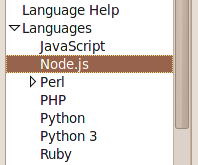
Komodo IDE: Node Settings

Without any configuration, Komodo should find node if it's on your path, and give you autocompletion for everything in the core library. The recursive scanning of node library directories is not quite there yet, so you'll have to manually add the path of each npm module you want to use. Once you have, you'll get autocomplete for those third-party modules as well.

As far as I'm aware, Komodo is the first IDE to provide this feature for Node.
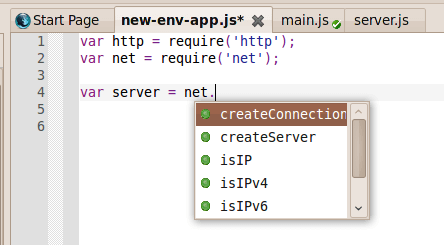
Komodo IDE: Node.js Autocomplete

Komodo uses heuristicts (i.e. looking for things like 'require('foo')' or '#!/usr/bin/node' in the file) to detect when a JavaScript file is actually Node.js. If for some reason you're not getting autocompletion in the Node namespaces, check the language detection panel of the status bar on the bottom right and override the detected language if necessary.

Debugging

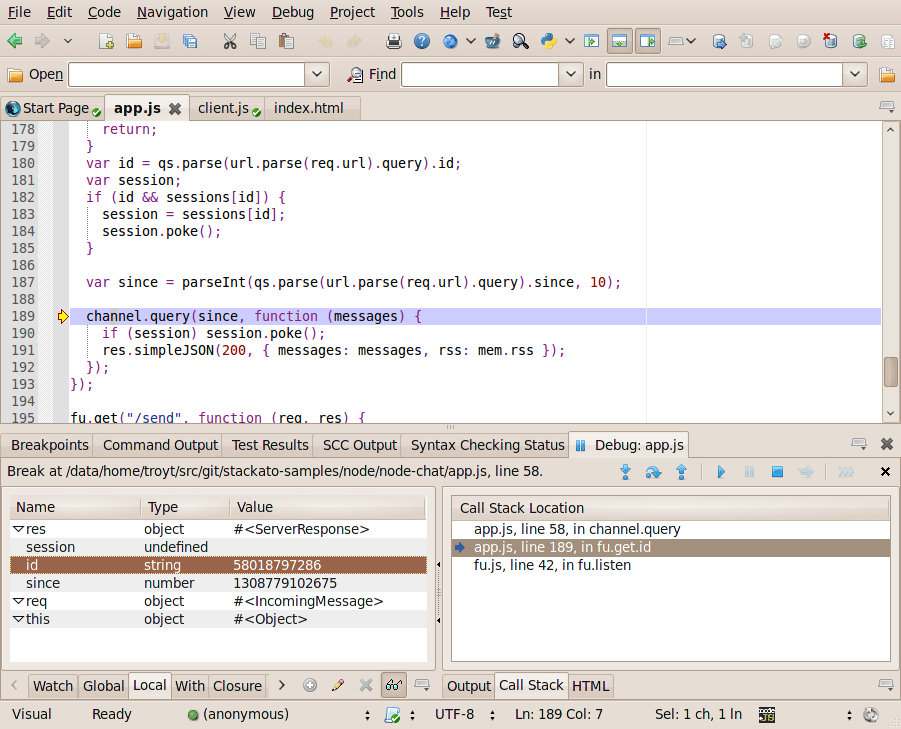
We've also added Node debugging!

Komodo IDE: Node Debugging

You can run and step through the code, set breakpoints, examine and edit variables, and all of the things you can do when debugging Python, PHP, Perl, Ruby or Tcl in Komodo.

When starting the debugger, you may be prompted to create a mapped URI for linking the URI provided by the debugger with the file system location (e.g. file://127.0.0.1/path/to/file --> file://path/to/file), but once you save the mapping things should work fine. Like the recursive code intelligence scanning, we'll fix this so it all happens automatically in future releases.

Stackato integration and movable panes

Along with the Node features, we've also fulfilled a very long standing feature request: the ability to move the tabs in the sidebars and bottom pane around. If you want to put the Toolbox in the left sidebar, and the Debugger in the right - go for it.

There's also integration with our cloud platform, Stackato. That takes a bit more explaining, so I'll make it the subject of it's own upcoming blog post.

Upgrades and support

For those of you who are torn between buying Komodo 6 now vs. waiting for the official Komodo 7 release, you can essentially get both (think of it as "upgrade insurance") by getting the Upgrades & Support subscription. When Komodo 7 is released, you'll be good to go.

Trackback URL for this post:

http://www.activestate.com/trackback/3090
Category: komodo
About the Author: RSS

Troy Topnik is ActiveState's technical writer. After joining ActiveState in 2001 as a "Customer Relationship Representative" (AKA Tech Support), Troy went on to lead the PureMessage Enterprise Support team before moving on to a technical writing role in 2004. His talent for describing software for new users stems from his difficulty understanding things that developers find obvious. He has a Bachelor of Music from the University of Victoria.

SHARE THIS:

Comments

10 comments for Node.js support in Komodo 7 Alpha 3
Permalink

I can't finally we'll finally be able to rearrange the workspace!

Except that it's either not working or I can't figure out how to do it. If I drag with the mouse, I can reorder the tabs in the bottom panel but that's all. I can't do anything with the left and right panels :-?

Log file only shows this:

[2011-06-24 11:06:21,960] [WARNING] root: ko.findresults was already loaded, re-creating it.

C:\Archivos de programa\ActiveState Komodo IDE 7\lib\mozilla\python\komodo\Crypto\Util\randpool.py:40: RandomPool_DeprecationWarning: This application uses RandomPool, which is BROKEN in older releases. See http://www.pycrypto.org/randpool-broken
RandomPool_DeprecationWarning)
C:\Archivos de programa\ActiveState Komodo IDE 7\lib\mozilla\python\komodo\twisted\cred\identity.py:23: DeprecationWarning: the md5 module is deprecated; use hashlib instead
import md5, types, sys, warnings

Permalink

Great!
but when could we make our Komodo support Bash script debug?

thanks your effort very much.

Permalink

I second this. Bash script debugging would be a long awaited feature.

Permalink

It's so cool what you guys do for Komodo but there's one thing I'm concerned with -- bugfixes and minor updates. I haven't seen minor update for quite some time and I take it is caused by all the efforts you put into Komodo 7. But there are issues that have been irritating me for so long and no help coming. Instead a new major version with cool new stuff but probably also with all those small issues users have been complaining about for ages. And since the same situation happened with ver. 5 -> 6 I do not expect it to be different this time. So maybe you should stop writing new code and start fixing it, at least for a while. Apart from that -- Komodo is a really cool product and many thanks for creating it!

Permalink

The Komodo team have still been making a lot of bug-fix changes for Komodo 6.1 as well. There is a planned release for Komodo 6.1.2, which will occur in July 2011.

We push out nightly builds for Komodo 6.1 with these latest changes (for users needing a faster bug-fix turnaround), you can download these builds here:
http://downloads.activestate.com/Komodo/nightly/

As for the Komodo issues you want to see fixed, please make sure there is a Komodo bug logged, as that way we can keep track of the request, as well as notifying you when a change/fix occurs:
http://bugs.activestate.com/enter_bug.cgi?product=komodo

Thanks,
Todd

Permalink

Hello.

Glad to see that the best generic IDE/editor will be even better.
I will specially appreciate the capability of putting the sidebars where I want, natively, without the need of extensions.

But, i will still miss the feature I posted in http://bugs.activestate.com/show_bug.cgi?id=84513

I do not see my suggestion as a "filtered Fast-open" but as a Navigation > Go to tab > [list of items] view.

It makes all the sense, because of the way the Ctrl+tab binding works by default. With Control pressed, you can not predict the window where any Tab hitting will go next.

Best of breed tools I use, always diserve my congratulations.

Best wishes and LONG LIVE Komodo,
Sérgio

Permalink

Will ActiveState ever make ActiveJavascript as part of their line? Javascript is coming on strong as a server side and general purpose scripting language. There are some very fast Javascript compilers out now: V8, Spidermonkey, DMDScript. And when node.js gets ported to windows (MS has contracted with Joyent to do this) that will open up a lot of power to Javascript as node.js has the ability to add libraries to Javascript just as Perl's CPAN does.

Permalink

Good question. An "ActiveJavascript" wouldn't make a lot of sense for us (hard to improve on V8 or Spidermonkey) but we've thought and talked about an "ActiveNode".

Several months ago, we started getting tweets and emails from people who were looking for an easy way to install Node.js on Windows. At that time, getting node to run on Windows was pretty tricky and it looked like there might be an opportunity for us to help. The Windows porting effort has moved very quickly though, and now with Joyent, Microsoft and Rackspace working together on it, I'd say the problem is in good hands.

That doesn't mean we couldn't do a supported distribution if there were enough demand for it, but right now our Node efforts are focused on Komodo and Stackato.

Permalink

Hi, hope somebody can help me with support for node.js. I have Komodo Edit 7.0.0c3 installed on Mac OS/X, but I can't get autocompletion to work.

The node executable is in my path (/usr/local/bin/node) but Edit did not find it without manual configuration. I've tried setting npm module paths in the Komodo preferences dialog, and in the project preferences dialog. I can't get Komodo to search any .js files except those in my actual project directory:

[2011-12-27 16:21:57,089] [ERROR] koCodeIntel: error evaluating completions:
trigger:
log:
info: eval 'net' at test.js#4
info: start scope is (, [])
info: find 'net' starting at (, [])
info: is 'net' accessible on (, [])? yes
info: _hit_from_first_part: found elem: variable 'net' at []
info: lookup 'net' in
debug: _hits_from_citdl: first part: [u'net'] -> [(, (, []))]
info: resolve 'require()' type inference for :
info: _hits_from_variable_type_inference: resolving require('net')
info: find 'require' starting at (, [])
info: is 'require' accessible on (, [])? no
info: is 'require' accessible on (, [])? yes
info: _hit_from_first_part: found elem: function 'require' at []
info: lookup 'require' in
info: found 1 hits in lib
debug: _hits_from_citdl: first part: ['require'] -> [(, (, [])), (, (, []))]
debug: _hits_from_citdl: resolve '()' on in (, [])
warn: could resolve call on : no return type info for
debug: _hits_from_citdl: resolve '()' on in (, [])
warn: could resolve call on : no return type info for
error: evaluating 'net' at test.js#4: No completions found

Permalink

Please ignore previous comment - I finally discovered that the "filetype" setting (lower-right corner) had to be changed from "JavaScript" to "Node.js".

Post new comment

The content of this field is kept private and will not be shown publicly.
  • Web page addresses and e-mail addresses turn into links automatically.
  • Allowed HTML tags: <a> <em> <strong> <cite> <code> <ul> <ol> <li> <dl> <dt> <dd>
  • Lines and paragraphs break automatically.
  • Each email address will be obfuscated in a human readable fashion or (if JavaScript is enabled) replaced with a spamproof clickable link.

More information about formatting options

By submitting this form, you accept the Mollom privacy policy.