Komodo IDE 7: Loaded with Features for Faster Editing, Debugging, Deploying
The new Komodo 7 has an arsenal of features to help you get your development work done faster.
| Browse Komodo's features by category: | ||
| New in Komodo 7 | Code Intelligence | Integrated Tools |
| Breadth | Sweet Editor | Extensible / Customizable |
| Debugging | Navigation & Search | Little Differences |
New in Komodo 7
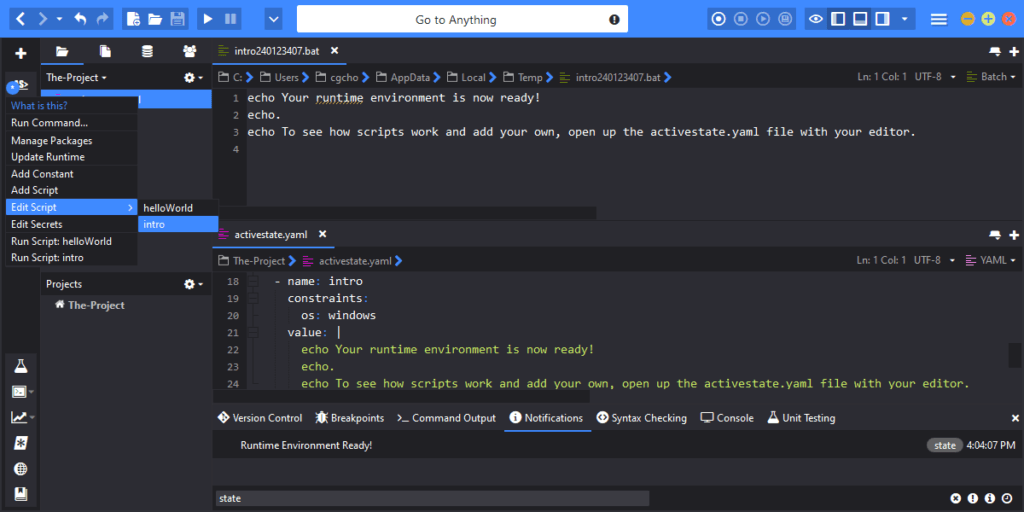
Deploy to Cloud with Komodo IDE and Stackato
Push your application directly to the cloud with Komodo IDE's integration with Stackato, ActiveState's cloud platform for creating your private Platform-as-a-Service (PaaS).
Komodo Sync
Switch between workstations without missing a beat. The new Synchronization feature lets your securely share your toolbox, key bindings, color schemes, templates, server lists, API catalogs and preferences across multiple machines.*
Real-Time Code Collaboration
Speed up development time by editing with other users simultaneously. Code Collaboration shares changes to selected Komodo IDE 7 users in real time, with helpful highlights to identify what was changed*. Team coding has never been easier!
Code Profiling
Highlight code hotspots and detect performance issues faster with Code Profiling. It supports Python (both 2.x and 3) and PHP (5.2 or higher), and can read Cachegrind/Callgrind and pstats profiling formats.
Full Node.js Support
Komodo IDE now fully supports Node.js, including syntax checking, debugging and code intelligence (auto-complete, calltips, code browsing, etc.)
More Languages and Frameworks
Stay current with Komodo IDE 7's expanded language support, with editing and syntax checking for CoffeeScript, LESS, SCSS, EJS and Mojolicious, as well as improvements for previously supported languages (Python, PHP, Perl, Ruby, Tcl, JavaScript, CSS, HTML, XML, XSLT).
Better Syntax Checking
Improved syntax checking gives you more choice and accuracy. Check multi-language documents (ie. Javascript or CSS within HTML), enable checkers on a per-file or per-language basis, and see all errors and warnings in a single tab.
Performance
Starts faster and works smarter. Built on Mozilla 7.0, Komodo 7 gives you a better user experience with less loading time.
"If you work in any of the languages Komodo supports, you owe it to yourself to examine it (for free). If you work in any two of them, you probably should just buy it." —Andrew Binstock, Binstock on Software.
Breadth
Languages and Frameworks
Full debugging, code intelligence and editing for Python (including Python 3), PHP, Perl, Ruby, Tcl, XSLT and Node.js.
Full code intelligence and editing support for HTML (including HTML 5), JavaScript, CSS (including CSS 3), XML, XUL, and templates including EJS, epMojo, RHTML, Django, Mason, Smarty and Template Toolkit.
Excellent editing support for dozens of other languages, including C/C++, JSON, SQL, Erlang, CoffeeScript, LESS, SCSS and all things text.
Platforms
Full support for Windows, Mac and Linux so your editing tool doesn't have to force your development platform. The way it should be. One Komodo IDE license entitles you to usage on all platforms.
Databases
Komodo IDE's Database Explorer includes support for MySQL, Oracle and SQLite.
Technologies
Komodo ships with API Catalogs (that provide auto-complete info) for all of Rails, Drupal, jQuery, YUI, Dojo, ExtJS, Prototype, OpenSocial and more.
Add-ons
Choose from 100+ add-ons and counting. Komodo's built-in and 3rd-party extensions provide support for CakePHP, OpenSocial, Zend Framework, Zen Coding and more.
Source Code Control
Out of the box Source Code Control support for Subversion, Git, Mercurial (hg), Perforce, CVS and Bazaar.
Debugging
Debugging for Six Languages
- PHP 4.4 - 5.3
- Python 2.4 - 3.2
- Perl 5.8 - 5.14
- Ruby 1.8 - 1.9
- Tcl 8.4 - 8.6
- Node.js
new Changed Variable Highlighting
You can easily tell when a variable has been changed. When debugging, Komodo IDE 7 highlights any variables that have changed from the last breakpoint.
Local & Remote
Just click "Debug | Go" to begin local debugging. Or use Komodo's remote debugging packages to have a separate process break into Komodo's debugger, ie. for debugging a web server script running via "mod_php", "mod_perl", a WSGI server, Rails, etc. The process being debugged can even be running on another machine.
Easy to Setup
Debugging is easy to setup. Often your first "Step In" works out of the box. Komodo just needs to find your interpreter (and it generally can).
Rich Breakpoints
A rich set of breakpoint types is available to make tracking down a bug faster: break on file and line, conditional, watch for variable value changes, break on function call, on function return, on exception.
Multi-Session
Multi-session support allows you to simultaneous debug multi-process: step through both sides of a Python client calling a REST API implemented in Rails. You can even use Komodo IDE's HTTP Inspector to debug the HTTP traffic.
Multi-Threaded
Multi-threading support allows stepping through and breaking multiple threads. Engineers on Mozilla's build team use Komodo IDE's Python debugger to trace multi-threaded buildbot code.
Built on DBGP
Komodo IDE's debuggers are built on the DBGP protocol co-authored by ActiveState and currently used in many IDEs.
Rx (Regular Expression) Toolkit
Write, understand and learn regular expressions faster with Rx. Komodo IDE's multi-language Rx supports using any of Python, Perl, Ruby or JavaScript as the backend engine.
HTTP/Ajax Debugging with HTTP Inspector
Inspect, intercept, and tweak browser-server communications. View and edit individual transactions break on requests or responses, and submit modified traffic.
Code Intelligence
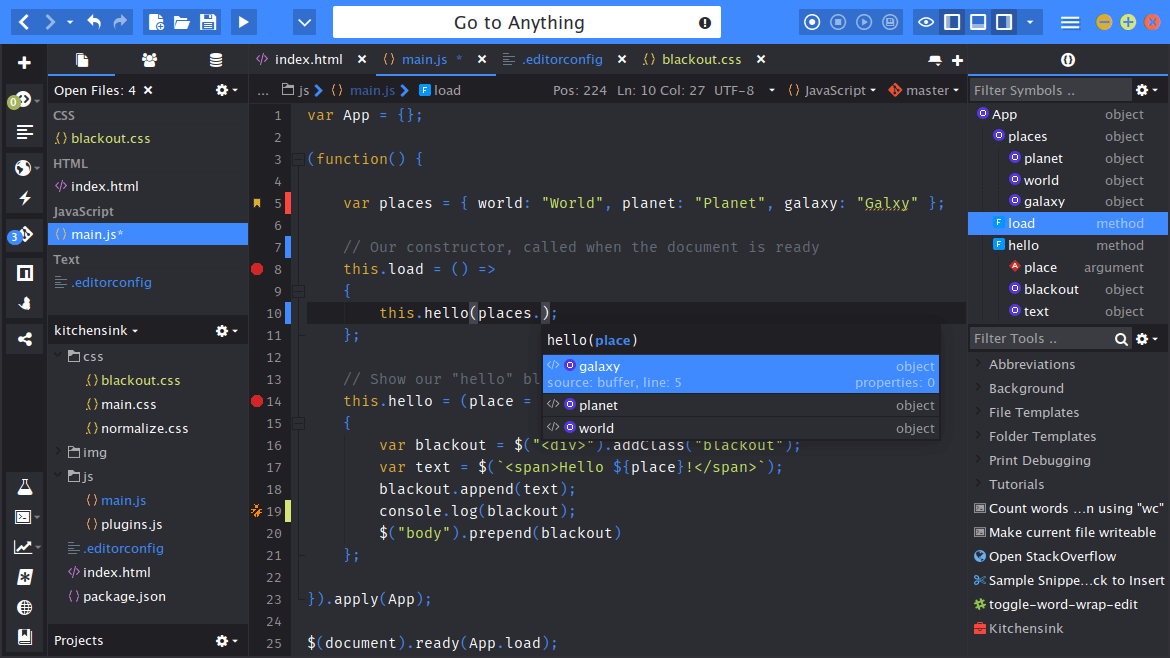
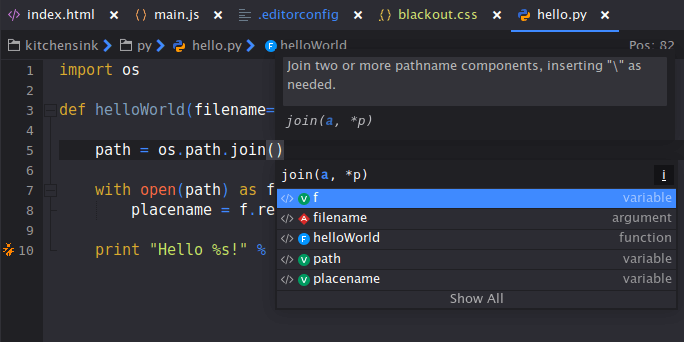
Smarter Auto-complete & Calltips
Write code faster and shorten the learning curve with code completion that guides you as you work.
Multi-Language
Code intelligence for Python, PHP, Perl, Ruby, Tcl, HTML, JavaScript, CSS, XML, XSLT, Node.js and more, as well contextually accurate code intelligence in multi-language files such as CSS in HTML, JavaScript in PHP, etc.
Sections List
A quick outline of your code structure and the quickest way to find and jump to a function or class.
Code Browser
Easily navigate and filter source structure in a tree view of code objects.
new Code Browser gives you the option to view only the objects in your currently opened file, or any other files you wish. It also syncs your Editor view to your Browser position.
Go to Definition
Jump to a symbol definition quickly, with a key stroke or with Ctrl+click (Cmd+click on Mac).
Extensible
The code intelligence system is very extensible. Extensions can provide support for new languages. As well, the following provide some simpler hooks.
API Catalogs
Auto-complete and calltip info for a language module (ie. PyWin32, jQuery, YUI, PyQt) can be provided in a standardized XML file that describes the API.
Schema-based XML Auto-complete
An XML catalog file and any of a DTD, XML Schema or Relax NG schema can be given to provide auto-complete for XML dialects.
Sweet Editor
Syntax Coloring
Fast and accurate syntax coloring for dozens of languages. Here documents and long Python docstrings can confuse some syntax colorers. Not Komodo's.
It even works within multi-language documents, ie. Ruby, HTML, JavaScript and CSS in RHTML.
IME Support
Support for native operating system input method editors to input Chinese, Japanese, Korean and Indic characters on Western keyboards.
Exceptional Basics
Komodo's Editor sports all the basics and then some: folding, column/block editing, find highlighting, a tabbed editor, split view, multi-window support.
Background Syntax Checking
Out-of-the-box background syntax checking for all core languages. Never waste time on an accidental syntax error again. If you are learning a new language, syntax checking will help you along.
newWorks within multi-language documents (ie. CSS in HTML), and can be enabled on a per-file/language basis.
Soft Characters == Less Typing
Type an open quote in your code file and Komodo will insert the close quote for you (a soft character). Type the close quote and Komodo will know that you want two quotes, not three. Likewise for parentheses. It'll save you time.
Abbreviations == Less Typing
Insert common boilerplate snippets and template code with a short abbreviation. Use Komodo's tabstops and interpolation shortcuts to define powerful and re-usable snippets.
Code Formatting == Nicer Code
Komodo supports an extensible system for code formatting. Plugin your favored code formatter and access it quickly via the "Format" in the context menu.
Vi Keybindings
Vi/Vim keybindings in a graphical IDE, the perfect combination. Vi emulation so good you'll be tweeting "I can't believe it's not Vim".
Hyperlinks, Go To Definition
Jump to the definition of a variable or function with Ctrl+hover and Ctrl+click (Cmd on Mac). Go to definition. Follow URLs. Edit a color in CSS. Define your own handlers.
Smart Auto-indenting, But Not Smart-Alleck
Language-aware smart auto-indenting frees your mind of indentation. However, Komodo doesn't try to be too smart, to avoid unproductive obsessing with whitespace.
Extensible with UDL
Syntax coloring support for new languages can be added via Komodo extensions using the User-Defined Languages (UDL) system. Komodo itself uses this for HTML, RHTML, Django HTML Templates, Smarty, Mason, etc. The excellent 3rd-party SciViews-K extension uses UDL for R syntax support.
Navigation & Search
Kick-ass Find & Replace
Komodo's find & replace system is fast and friendly. It supports full regular expression syntax (with Rx integration), Find/Replace in Files (with confirmation), Find/Replace in Project, multiline search and Unicode support.
Editor History
Komodo remembers where you've been editing so you can easily jump back to previous positions in your code.
BookmarksMark important lines and quickly jump back to them.
Jump to Matching Brace/Tag
Easily jump (or select) to the matching brace, or matching tag in an HTML/XML file.
Projects & Places
The Places sidebar makes navigating your source tree, whether local or remote, simple. It integrates with project files, source code control, Publishing, and mirrors actions on the file system so you don't need to leave Komodo IDE for managing your files.
Fast Open
The fastest way to open files. A simple and speedy dialog that helps you find the file you want with minimal keystrokes.
new Preference Searching
A new search box lets you search preference categories, saving you time when changing settings.
Integrated Tools
new Stackato
Launch the Stackato interface from the main toolbar to enable development, debugging and deployment to the cloud.
Subversion, Git, Mercurial, ...
... Perforce, CVS, Bazaar. Integration with major source code control systems enables you to perform repository checkouts and updates, file diffs, view commit history, revert and make multi-file commits--all from within Komodo IDE.
Code Formatting
Extensible code formatting system. Out of the box formatters for HTML, XML, JavaScript and JSON.
DOM Viewer
Live updating tree view of an XML or HTML document.
Toolbox
Easily integrate shell commands, code snippets, and macros (supporting both JavaScript and Python) into your workflow.
Database Explorer
Quickly access databases in order to view tables and database schemas, perform custom queries or view and edit table rows. Database Explorer supports SQLite out of the box, with available extensions for MySQL and Oracle.
Publishing
Sometimes editing locally makes more sense than editing remotely. With Komodo IDE's Publishing system, you can easily keep local and remote directories in sync.
Interactive Shells for Python, Ruby, Perl and Tcl
Try out and test code in the interactive shell.
Spell Checking
Easy spell checking of your text documents.
Unit Testing
Integrated running of tests for many popular frameworks: PHPUnit, Perl TAP, Python unittest, and Ruby's rake test.
Perl Dev Kit
Integration with ActiveState's Perl Dev Kit (PDK), a suite of tools for creating and deploying applications in Perl. Create Perl executables from within Komodo IDE.
Tcl Dev Kit
Integration with ActiveState's Tcl Dev Kit (TDK), a suite of tools for the professional Tcl developer.
Code Recipes
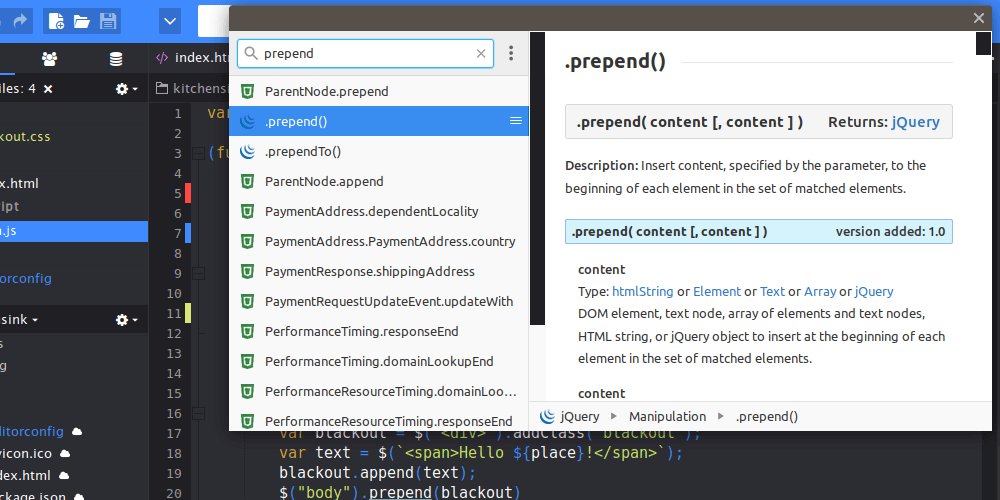
Easily find and insert recipes from the ActiveState Code Recipes site (home of the popular Python Cookbook) with the Recipes Add-on.
Extensible / Customizable
Firefox-style Extension System
Komodo has long included an add-ons system based on Firefox's. It is a robust system that allows deep extension of Komodo. The Komodo Add-ons site includes many useful extensions. Among them:
- Zen Coding provides a dialect for high-speed HTML, XML, XSL authoring.
- MoreKomodo adds a number of useful features.
- SciViews-K "transforms Komodo into an R editor and GUI."
Customizable
Komodo is highly customizable via an extensive preferences system and attention to many years of quality user feedback.
new Move side-pane widgets to a different pane and select the individual toolbar items you wish to be shown in the Tools menu.
Custom Keybindings
Out-of-the box keybindings, including Vi keybindings, are a good start. Almost any action in Komodo is a command that can be given a keybinding. As well, any Macro, Snippet or Run Command in the Toolbox can be given a keybinding.
Syntax Color Schemes
Syntax coloring is fully customizable. Schemes (".ksf" files) are simple text files that can be dragged onto Komodo to install. There are many available.
Little Differences
Sometimes it is the little differences that make all the difference.
Fast Open
Cast your OS's file picker dialog aside. Fast open is the more intelligent way to find and open files.
Invoke Tool
Find and run tools from your Toolbox in a snap.
Auto-Commenting
One keybinding to comment the current line or selection for any of dozens of languages.
Re-open Last Closed Tab
Accidentally close one too many files? Ctrl+Shift+T and its back. Just like your browser.
Mapped URIs
Map a URI pattern to a local path. Now you can drag URLs from the browser to Komodo to open local files. Doesn't seem useful? Think github blob URLs. FishEye URLs. OpenGrok code search result URLs. CSS URLs in Firebug.
Projects or Not, Your Choice
Komodo Projects provide a way to save some preferences that pertain to a project, to save where you are working. However, you are never penalized for not using a project. Open a file and get editing.
Complete Word with Tab
If you like to haveLongVariableNamesLikeThis or even not_so_long names, turn on tab-completion for words in your file to save time.
Configurable Help Command
Customize Ctrl+? and Shift+? to perform a language sensitive search for the word under cursor.
Macro Recording
Record a quick macro for repeating a tedious action, or to learn the Macro API for writing more complex macros.
Workspace Restore, Auto-Save
Regular saving of your files and workspace ensure that you never lose your code or your place.
new Notifications Panel
A single panel keeps track of all events, including Statusbar messages, SCC actions and code intelligence scanning, helping you easily review your workflow.
"The increase in productivity I got from the interactive debugging environment in Komodo IDE probably saved me more than the purchase price within 48 hours. This is a quality product." —Graeme Robinson, Memex Inc.
*All settings in Komodo Sync and Code Collaboration are maintained by ActiveState. For full terms of service, please see Komodo IDE license agreement.